
It’s one of the most searched questions in the IPTV world right now, and honestly, it deserves a straight answer rather than the vague, hedging responses you’ll find on most websites. So here it is: yes, IPTV can work without a VPN in the UK — but whether you should use one depends entirely on the type of IPTV service you’re using and what you actually want from your streaming setup.
Let’s break this down properly.
First, Understand That Not All IPTV Is the Same
This is the part most articles skip over, and it’s the most important context for everything that follows. IPTV — Internet Protocol Television — is simply a method of delivering television content over the internet rather than through a satellite dish or cable. That’s it. The technology itself is entirely neutral.
What varies dramatically is the source of the content being delivered:
Licensed IPTV services — platforms like ITVX, BBC iPlayer, Channel 4, Now TV, and even international services like Netflix — are fully legal, properly licensed, and operate with complete transparency. They pay broadcast rights, they follow Ofcom regulations, and they have every legal right to stream the content they offer.
Unlicensed IPTV services — sometimes called grey-market or third-party IPTV — offer access to premium channels, live sports, and international content through unofficial means. These services exist in a very different legal and technical landscape.
When people ask “does IPTV work without a VPN in the UK,” they’re almost always asking about the second category. So that’s where we’ll focus.
Technically Speaking: Yes, It Works Without a VPN
From a purely technical standpoint, most IPTV services — licensed or otherwise — will function without a VPN. Your MAG box, Fire Stick, Smart TV, or IPTV app will connect to the stream, load the portal, and play content. There’s no built-in technical wall that requires a VPN to get channels working.
UK internet connections are fast, broadband infrastructure is strong, and ISPs generally don’t throttle IPTV streams the way they might throttle torrenting traffic. So if you set up your IPTV service today without a VPN, there’s a reasonable chance it will just… work. The picture loads, the channels play, and you watch your content.
That’s the honest technical answer. But it’s only half the story.
Why Many UK IPTV Users Still Choose to Use a VPN
Even when IPTV functions without a VPN, there are several practical reasons why a significant portion of UK viewers opt to add one to their setup.
ISP Monitoring and Throttling
UK internet service providers are permitted to monitor the type of traffic passing through their networks. While most major ISPs don’t actively block IPTV streams, some have been known to throttle bandwidth during peak hours or when sustained high-bandwidth streaming is detected.
Privacy and Digital Footprint
Even for viewers using completely legitimate IPTV services, some people simply prefer not to have their viewing habits logged. Your ISP builds a picture of your online behaviour over time — what you watch, when you watch it, how long for. A VPN prevents that data from being collected. It’s less about fear and more about principle for many users.
Geo-Restrictions on Certain Content
Some IPTV content — particularly international channels or sports events with regional blackout restrictions — can be geo-locked even within the UK itself. A VPN lets you shift your apparent location to access content that might otherwise be restricted, whether that’s a blacked-out football match or international streaming libraries.
Network Security
If you’re streaming on a shared network — a rental property with shared broadband, a student hall, or a workplace connection — a VPN adds a layer of encryption that protects your activity from others on the same network.
The Legal Question: What UK Law Actually Says
Using a VPN in the UK is entirely legal. There is no law that criminalises the use of VPN software. You can install a VPN on any device, run it at all times, and face no legal consequences whatsoever from the act of using it.
What matters legally is not the VPN — it’s the content being accessed and the service providing it.
Licensed IPTV services like those offered through reputable providers — including Star Prime Media at starprimemedia.com — operate within legal frameworks and provide content through properly maintained systems. Watching content through a legitimate subscription service, with or without a VPN, is perfectly fine.
The legal grey area exists specifically around services that redistribute premium broadcast content — live Premier League matches, Sky Sports, pay-per-view events — without holding the appropriate broadcast rights. UK courts have increasingly taken action against operators of such services, and the Digital Economy Act gives authorities significant powers in this space. The legal risk sits primarily with the operators, not individual viewers, but it’s a landscape worth understanding clearly.
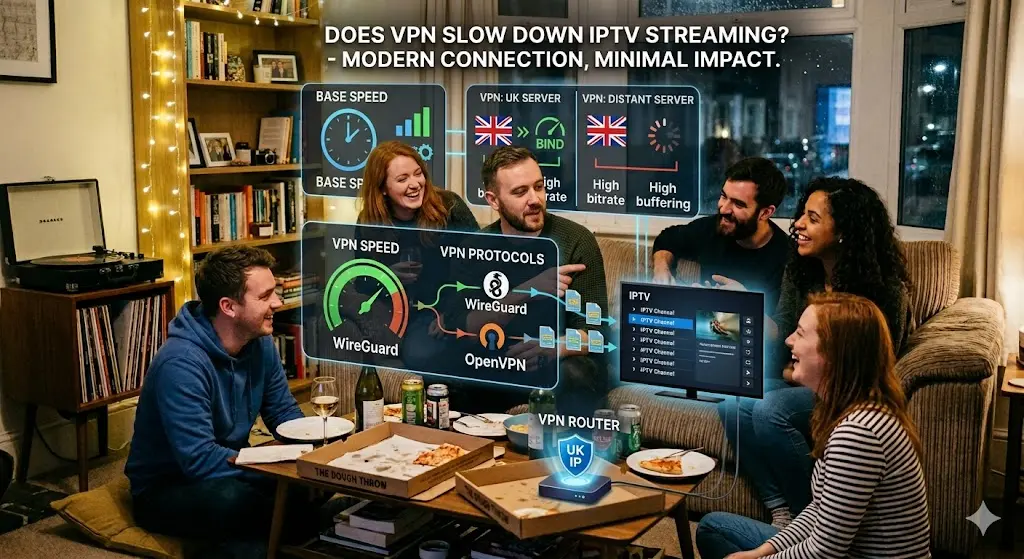
Does a VPN Slow Down IPTV Streaming?
This is a legitimate concern and one worth addressing honestly. Yes, a VPN can introduce latency and reduce speeds — but in practice, the impact on modern connections is minimal if you choose the right service.
A few things that determine whether your VPN hurts or barely affects your stream:
Server Location — Connect to a UK-based VPN server rather than routing your traffic through a server in another country. The closer the server, the lower the latency.
VPN Protocol — Modern protocols like WireGuard are dramatically faster than older options like OpenVPN. Any decent VPN provider offers WireGuard in 2026, and it adds almost no perceptible delay.
Your Base Speed — If you’re working with a 100 Mbps+ broadband connection (standard for most UK homes now), even a 20–30% speed reduction through a VPN still leaves you with more than enough bandwidth for 4K IPTV streaming.
VPN Provider Quality — Free VPNs are almost universally terrible for streaming. They’re overcrowded, slow, and often log your data anyway — defeating the entire purpose. Paid providers like ExpressVPN, NordVPN, or Surfshark offer dedicated streaming-optimised servers that perform reliably.So Should You Use a VPN for IPTV in the UK?
Here’s the honest, direct answer based on your situation:
If you’re using a fully licensed IPTV service like Star Prime Media — you don’t need a VPN for the service to work. Your streams will load, your channels will play, and your experience will be smooth. A VPN is entirely optional and comes down to personal preference around privacy.
If you want added privacy from your ISP — a VPN is worth considering. It costs a few pounds a month, runs in the background invisibly, and gives you the peace of mind that your viewing habits aren’t being tracked or stored.
If you’re experiencing buffering or inconsistent speeds — try a VPN first before assuming the issue is your IPTV provider. Sometimes ISP throttling is the culprit, and a VPN can resolve it immediately.
If you’re on a slow connection below 25 Mbps — be cautious. Adding a VPN layer on an already marginal connection can push you below the threshold needed for stable HD streaming.
The Bottom Line
IPTV works without a VPN in the UK. That’s simply true. The streams connect, the portal loads, and the channels play without any VPN requirement from a technical standpoint.
Whether you add a VPN is a separate decision — one based on your priorities around privacy, potential ISP throttling, and the type of content you access. For most viewers using a quality, legitimate IPTV subscription, it’s an optional enhancement rather than a necessity.
What matters most is starting with a reliable, well-maintained IPTV service in the first place. Star Prime Media (starprimemedia.com) offers UK customers a robust channel lineup, consistent streaming performance, and genuine customer support — the kind of foundation that makes your IPTV experience enjoyable whether you run a VPN alongside it or not.
Get your subscription sorted first. Then decide on the VPN. In that order.