
With the rise of IPTV, Android TV users are increasingly looking for ways to watch live TV, movies, and sports without the need for traditional cable. One of the most powerful tools for achieving this is the STB Emulator app, which allows you to replicate the experience of a set-top box on your Android TV. In this guide, we’ll provide a step-by-step, easy-to-follow STB Emulator IPTV setup tutorial, explain its features, and give tips to optimize your streaming experience.
What is STB Emulator?
STB Emulator is an application that simulates a standard IPTV set-top box on Android devices. Instead of relying on proprietary hardware, you can use your Android TV to access live TV channels, VOD (Video on Demand), and catch-up content through your IPTV subscription.
Key benefits of using STB Emulator:
- Works with most IPTV services that provide M3U playlists or portal URLs
- Supports live TV, movies, and series
- Offers EPG (Electronic Program Guide) for scheduling and channel info
- Compatible with Android TV, phones, tablets, and Fire TV devices
- Provides a familiar set-top box interface
Prerequisites Before Setup
Before you start the STB Emulator setup, ensure you have the following:
- Android TV device: Smart TVs or TV boxes running Android TV OS
- Stable internet connection: Minimum 10 Mbps recommended for HD streaming
- IPTV subscription: A legal IPTV service with M3U playlist or portal URL
- STB Emulator app: Downloadable from the Google Play Store or APK sites
Pro Tip: Always use a legal IPTV service to avoid unreliable streams or potential legal issues.
Step-by-Step STB Emulator Setup on Android TV
Step 1: Install STB Emulator
- Open Google Play Store on your Android TV
- Search for “STB Emulator”
- Download and install the app
Alternatively, you can install the APK version if it’s not available in your region.
Step 2: Launch the App and Access Settings
- Open STB Emulator on your Android TV
- On the main screen, select “Settings”
- Navigate to “Portal Settings”
The portal is where your IPTV subscription connects to the app.
Step 3: Enter Portal URL
- Under Portal Settings, select Portal URL
- Enter the URL provided by your IPTV provider
- Choose a STB Model – most services recommend MAG 250/254 for compatibility
- Save the settings and exit
Tip: Some providers also offer M3U playlist files. You can use the “Playlist Mode” in STB Emulator to load these directly.
Step 4: Load Channels and EPG
- Once the portal URL is entered, STB Emulator will connect to your IPTV provider
- Channels and EPG (Electronic Program Guide) will automatically load
- Navigate the channel list using your TV remote
You should now see live TV channels, VOD content, and scheduled programming in a set-top box-like interface.
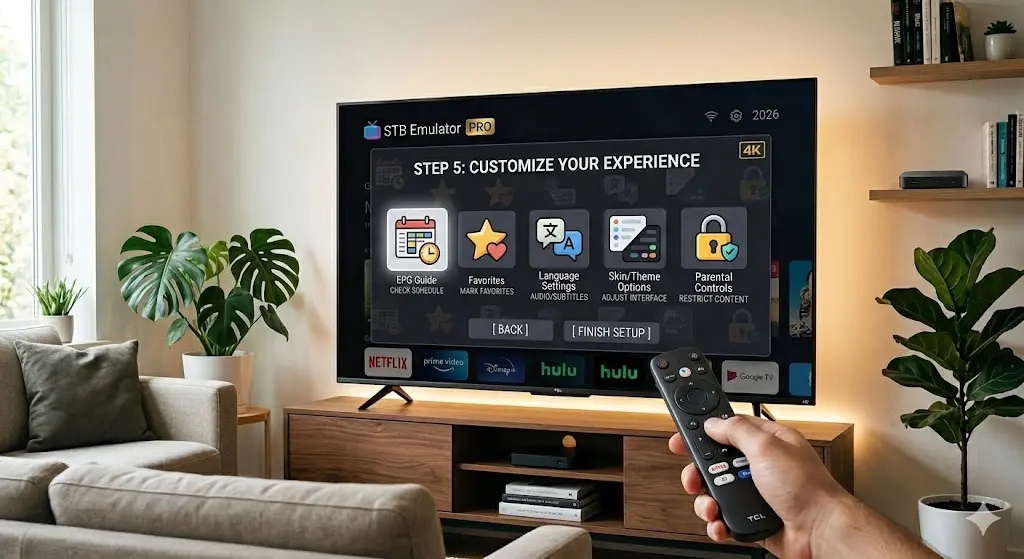
Step 5: Customize Your Experience
STB Emulator offers several features to enhance your viewing:
- EPG Guide: Check the schedule for upcoming shows and events
- Favorites: Mark your favorite channels for quick access
- Language Settings: Switch audio and subtitle options if supported
- Skin/Theme Options: Adjust interface appearance for comfort
- Parental Controls: Restrict adult channels or sensitive content
Tips for Optimizing STB Emulator on Android TV
- Stable Internet: Ensure a wired Ethernet connection for HD or 4K streams to avoid buffering
- Update Firmware: Keep Android TV OS and STB Emulator updated for best performance
- Remote-Friendly Navigation: If your TV remote is limited, consider a wireless mouse or Android TV remote app
- EPG Accuracy: Refresh EPG regularly to see up-to-date programming
- Resolution Settings: Adjust video output in STB Emulator to match your TV’s native resolution
Troubleshooting Common Issues
Even with proper setup, you might encounter problems. Here’s how to fix the most common ones:
| Issue | Solution |
|---|---|
| Channels not loading | Check portal URL and internet connection; restart app |
| Buffering | Lower stream resolution; use wired connection |
| EPG not showing | Refresh EPG or re-enter portal settings |
| Black screen on launch | Clear cache and restart STB Emulator |
| Remote not working | Use Android TV remote app or connect wireless mouse |
Advantages of Using STB Emulator for IPTV
- Set-top box experience without hardware: Enjoy the MAG or other IPTV set-top box interface directly on your TV
- Wide compatibility: Works with multiple IPTV providers
- Cost-effective: No need to buy expensive hardware; just use Android TV
- Feature-rich interface: EPG, VOD, parental control, and multi-language options
- Customizable: Adjust themes, resolution, and favorites for a personalized setup
Final Thoughts
STB Emulator turns your Android TV into a fully functional IPTV set-top box, giving you access to live TV, sports, movies, and series without the need for traditional cable.
For 2026, it remains one of the most flexible and reliable IPTV tools, especially for Android TV users who want a familiar, set-top box experience. By following this guide, you can easily set up STB Emulator, load your IPTV subscription, and enjoy seamless streaming right from your living room.
Whether you are a casual viewer or a hardcore sports fan, STB Emulator makes IPTV simple, customizable, and enjoyable.