
Star Prime Media has become one of the most popular IPTV providers in the UK, offering live TV channels, on-demand content, and high-quality streaming at an affordable price. For new users, the 24-hour free trial is a great way to experience the service before committing to a subscription.
In this guide, we’ll explore what to expect from the Star Prime Media free trial, how to sign up, and tips to maximize your experience during the trial period.
Why Try the 24-Hour Free Trial?
Trying a service before paying is always smart. The Star Prime Media free trial allows users to:
- Test Streaming Quality: See how HD and 4K channels perform on your device.
- Explore Channel Selection: Browse live TV, movies, sports, and international channels.
- Check Device Compatibility: Ensure the service works on NVIDIA Shield, Firestick, Smart TVs, and mobile devices.
- Experience App Features: Familiarize yourself with the Star Prime Media interface, electronic program guide (EPG), and VOD library.
A free trial removes the risk of paying for a service that doesn’t meet your needs, especially for UK users who are price-sensitive and want reliable IPTV performance.
What You’ll Get in the 24-Hour Free Trial
1. Full Channel Access
The trial gives access to a wide range of channels including:
- UK and international TV
- Sports channels
- News channels
- Entertainment and movie channels
2. Video-On-Demand (VOD)
You can explore the on-demand content library, which includes:
- Movies in HD and 4K
- TV series and box sets
- Kids’ programming
3. Multi-Device Compatibility
Star Prime Media works on:
- Android devices (smartphones, tablets, NVIDIA Shield)
- Amazon Firestick & Fire TV devices
- Smart TVs (Samsung, LG, Android TV)
- PC and Mac via compatible IPTV players
4. User-Friendly Interface
During the trial, users can test features like:
- Electronic Program Guide (EPG): Quickly see upcoming programs
- Favorites List: Mark preferred channels
- VOD Search: Easily find movies or shows
- Settings & Customization: Adjust video quality, language, and interface layout
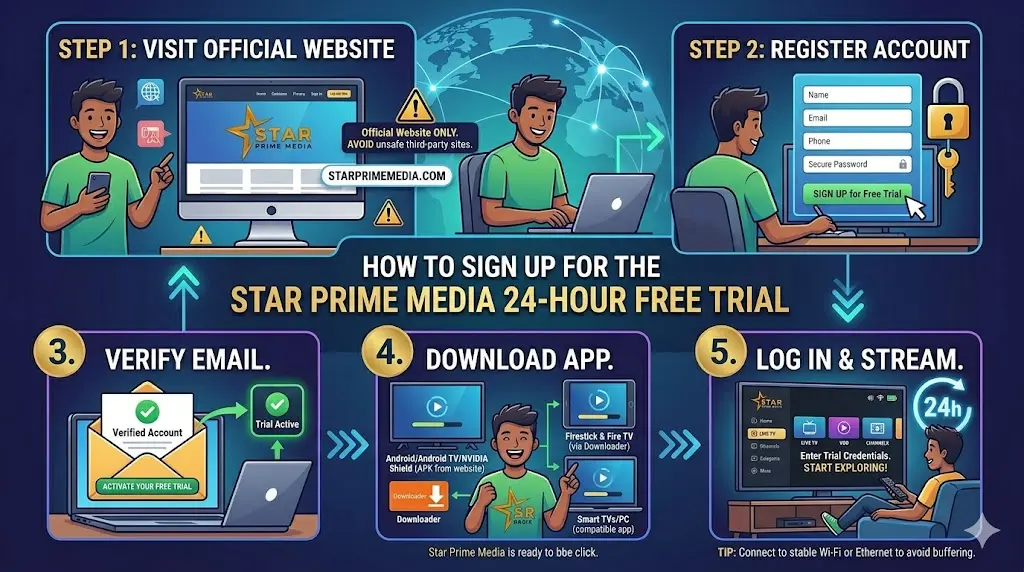
How to Sign Up for the Star Prime Media 24-Hour Free Trial
Step 1: Visit the Official Website
Go to Star Prime Media to access the trial registration page. Avoid third-party sites, as unofficial links may be unsafe.
Step 2: Register Your Account
- Click on Sign Up for Free Trial.
- Enter your name, email address, and phone number (if required).
- Create a secure password for your account.
Step 3: Verify Your Email
- Star Prime Media may send a verification email.
- Open the email and click Verify Account to activate your free trial.
Step 4: Download and Install the App
Depending on your device:
- Android/Android TV/NVIDIA Shield: Download the APK from the website.
- Firestick & Fire TV: Use the Downloader app to install the APK.
- Smart TVs or PC: Open the app compatible with your device.
Step 5: Log In and Start Streaming
- Open Star Prime Media on your device.
- Enter your trial credentials.
- Start exploring channels, VOD, and other features.
Tip: Make sure your device is connected to a stable Wi-Fi or Ethernet connection to avoid buffering issues during the trial.
Tips to Maximize Your 24-Hour Trial
1. Test Multiple Devices
If you have multiple devices, log in on each to see which performs best for your streaming needs.
2. Explore All Features
Use the full 24 hours to try:
- Live TV channels in different genres
- Video-on-demand content
- EPG and search functionality
- Recording or catch-up features if available
3. Evaluate Streaming Quality
Try streaming channels at different resolutions (HD, Full HD, 4K) to see what works best with your internet speed.
4. Take Notes
Keep track of:
- Channels you enjoy most
- Any buffering or playback issues
- Device compatibility performance
5. Contact Support if Needed
If you encounter any issues, Star Prime Media’s support team can help troubleshoot:
- Playback errors
- App installation problems
- Account login issues
Common Questions About the Free Trial
Q: Do I need a credit card for the free trial?
A: No, Star Prime Media typically offers the 24-hour trial without requiring payment information.
Q: Can I watch international channels during the trial?
A: Yes, most international channels available in the subscription are included in the trial.
Q: Will the trial auto-renew into a paid subscription?
A: The 24-hour trial does not automatically charge you, but you can upgrade to a paid plan if you wish.
Q: Can I cancel mid-trial?
A: Since no payment is required, there’s no need to cancel. You can simply stop using the trial after 24 hours.
Why Star Prime Media Stands Out
- Affordable and flexible plans after the trial period
- High-quality HD and 4K streaming for multiple devices
- Regularly updated channels and VOD content
- Secure and reliable IPTV service with minimal downtime
The trial gives a complete glimpse into what makes Star Prime Media a top choice for UK IPTV users.
Conclusion
The 24-hour free trial of Star Prime Media is an excellent way to explore live TV, VOD, and multi-device streaming without any commitment. By following the steps outlined above, users can easily sign up, install the app, and start enjoying hundreds of channels in high-quality HD or 4K.
For more information, official downloads, and to start your free trial today, visit the official Star Prime Media website: https://starprimemedia.com.
Trying the service firsthand ensures you make an informed decision before subscribing, giving you confidence in your IPTV choice.