
Streaming has changed the way we enjoy entertainment, and smart TVs have made that experience more immersive than ever. Among the many IPTV players available today, Ibo Player stands out for its sleek interface, smooth playback, and compatibility with a wide range of smart TV brands. If you’ve recently installed it and are wondering how to unlock the premium experience, this guide will walk you through everything you need to know.
In this blog post, you’ll learn how to activate Ibo Player Premium on your Smart TV, why premium access is worth it, common setup mistakes to avoid, and practical tips to ensure a smooth streaming experience.
What Is Ibo Player Premium?
Ibo Player is a media player application designed to stream IPTV playlists on smart TVs and other compatible devices. The application does not offer channels or content rewriting.. Instead, it allows users to load their own playlist or portal information from a service provider.
The premium version unlocks the full functionality of the app after the free trial period ends. Once activated, you can continue using advanced features without interruptions.
Premium access typically offers benefits such as:
- Continuous access after the trial period
- Faster and smoother interface performance
- Playlist and portal management options
- Better playback stability
- Enhanced user controls
- Long-term app usability on your TV
For frequent streamers, premium activation makes the experience much more reliable and convenient.
Before You Activate: What You’ll Need
Before starting the activation process, make sure you have the following ready:
- A Smart TV with Ibo Player installed
This may include Samsung, LG, Android TV, Google TV, or other compatible smart TV systems. - A stable internet connection
Activation requires internet access so the app can sync your device details. - The device MAC address and Device Key
These are shown on the main screen of the Ibo Player app when you open it. - A valid playlist or IPTV portal details
You’ll need these from your IPTV service provider after activation.
Having these prepared beforehand makes the process much faster.
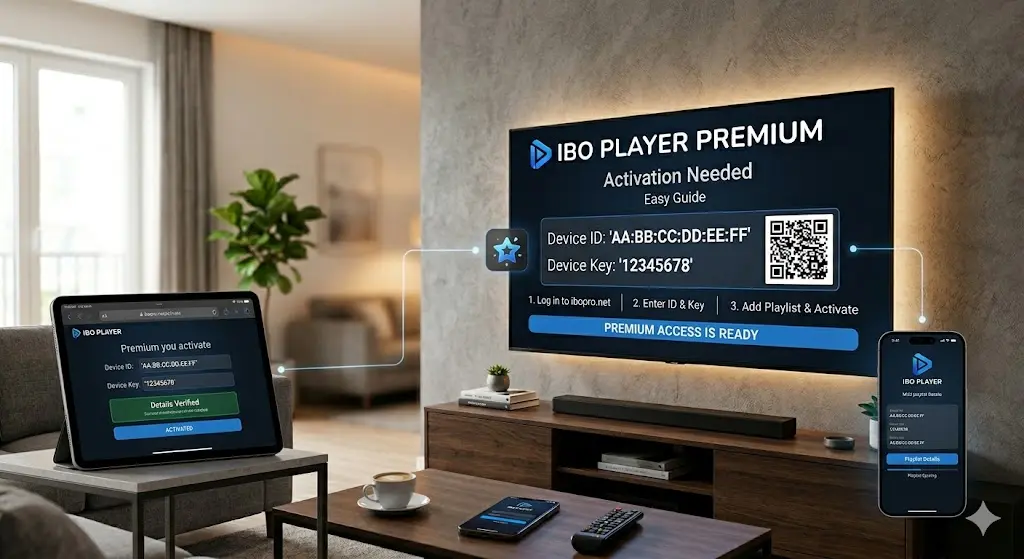
Step-by-Step: How to Activate Ibo Player Premium on Your Smart TV
Let’s go through the full process in a simple step-by-step format.
Step 1: Install and Open the App
First, download Ibo Player from your Smart TV’s app store.
- On Samsung TV: use the Smart Hub
- On LG TV: use LG Content Store
- On Android/Google TV: use Google Play Store
Once installed, open the app.
On the home screen, you will usually see:
- MAC Address
- Device Key
These two details are extremely important because they identify your TV.
Step 2: Visit the Official Activation Page
Using your phone or laptop, open the official Ibo Player activation website.
This is where you connect your TV app to your premium license.
Enter:
- Your MAC address
- Your Device Key
Double-check the details before moving forward. Even one incorrect character can prevent activation.
Step 3: Choose Premium Activation
After your device details are recognized, you’ll be given the option to activate the premium license.
Choose the premium plan available for your device.
Depending on the provider, this is often a one-time activation fee, which makes it attractive compared to recurring subscriptions.
Complete the payment using the available method.
Step 4: Upload Your Playlist or Portal
Once premium is activated, the next step is adding your content source.
You’ll usually see two common options:
Option A: M3U Playlist URL
Paste the playlist link provided by your IPTV service.
Option B: Xtream Codes / Portal Login
Enter:
- Server URL
- Username
- Password
This method is often easier for automatic organization of live TV, movies, and series.
After saving the information, return to your Smart TV.
Step 5: Restart the App on Your TV
Close the app completely and reopen it.
In many cases, your playlist loads instantly. If not, use the Refresh or Reload Playlist option.
Once loaded, your premium version should now be fully active, and your channels or media categories should appear.
Why Premium Activation Improves the Experience
Many users wonder whether activating premium is really worth it.
The answer depends on how often you stream, but for most users the premium version offers major advantages.
1) No Trial Expiration Issues
The free version is usually temporary. Premium ensures uninterrupted long-term use.
2) Better Performance
Premium users often experience smoother navigation and fewer loading delays.
3) Improved Playlist Management
Managing multiple playlists becomes easier and more organized.
4) Better Smart TV Optimization
The app tends to perform more efficiently across large-screen smart TV interfaces.
If you watch TV daily, premium activation is usually the best choice.
Common Problems During Activation (and How to Fix Them)
Even though activation is simple, users sometimes run into minor issues.
Here are the most common ones.
Incorrect MAC Address
This is the most frequent mistake.
Fix: Copy the MAC address exactly as shown on the TV screen.
Device Key Error
Sometimes users confuse letters and numbers.
Fix: Carefully recheck characters such as O and 0, I and 1.
Playlist Not Loading
This may happen if the playlist URL is expired or incorrect.
Fix: Ask your IPTV provider for an updated M3U link or portal credentials.
App Still in Trial Mode
Sometimes the TV app needs a restart.
Fix: Exit the app fully, reopen it, and refresh.
Best Tips for a Smooth Streaming Experience
Once your premium account is activated, these tips can improve performance even more.
Use High-Speed Internet
For HD and 4K streaming, a fast connection is essential.
A wired Ethernet connection is often better than Wi-Fi for stability.
Keep the App Updated
Always use the latest version of Ibo Player to benefit from bug fixes and performance improvements.
Organize Your Playlists
If your provider offers multiple categories, label them clearly for easier browsing.
Restart Your TV Occasionally
A quick restart clears cache and can improve app responsiveness.
Is Ibo Player Premium Safe to Use?
The app itself is simply a media player, so it is generally safe when downloaded from your TV’s official app store.
The more important factor is the playlist source you use.
For the best experience:
- Use trusted IPTV providers
- Avoid suspicious free playlists
- Never share your portal credentials publicly
- Use secure payment methods for activation
This helps protect both your viewing experience and your device.
Final Thoughts
Activating Ibo Player Premium on your Smart TV is a straightforward process that significantly improves your streaming setup. Once installed, all you need is your MAC address, device key, premium activation, and a valid playlist source.
The result is a much smoother, more reliable, and more enjoyable IPTV experience on the big screen.
Whether you use Samsung, LG, Android TV, or another supported device, following the steps above will help you get started in just a few minutes.
If you stream regularly, premium activation is absolutely worth it for the convenience, better performance, and uninterrupted access.
With the right playlist provider and a stable internet connection, your Smart TV can become a powerful entertainment hub.
Pro Tip: Bookmark this guide so you can quickly revisit the activation steps whenever you set up Ibo Player on a new TV.